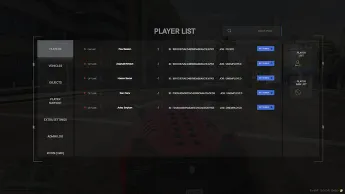
This script provides an admin panel for managing players with features like banning, viewing vehicles/objects, an in-game ticket system, and player communication. It also includes developer mode for advanced controls such as tracking players, spawning peds, and activating noclip mode, along with a log system to track admin activities.
The FiveM Admin System provides administrators with complete control over player management, server moderation, and event handling. Features include teleporting, kicking, banning, spectating, spawning items, and more. Designed for ease of use and fast actions, this system ensures smooth server operations and improves roleplay experiences through better admin tools.
Features
Active or inactive accessible player interaction system. (online/offline access)
Accessible ban system for the in game.
Vehicle and object list that you can view and create for the game.
In-game Player Support(Ticket) system.
Player and admin can message and post pictures with each other.
Available extra settings and developer mode system.
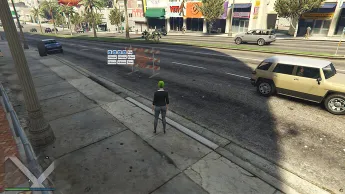
With developer mode, you can watch players and open your object, vehicle and ped tracking system.
You can also give ped to the players with developer mode and activate the noclip mode.
With the log system for the game, you can see what the admins are using and not using…
Recon can be accessed by staying for the game and you can restart, start and stop scripts.
Need help?
If you have any other questions or issues related to this product, you can contact us. This script works well with our Esx Admin Reports Script for enhanced roleplay communication
Visit if you’re looking for anything regarding this RedM script
Frequently Asked Questions
How do I install Fivem Admin system | Advanced Player Management on my FiveM server?
Download after purchase, extract to resources folder, add ensure fivem-admin-system to server.cfg, restart server.
Is Fivem Admin system | Advanced Player Management compatible with QBCore and ESX?
Yes, fully compatible with QBCore, ESX, QBox, and standalone FiveM servers.
Does Fivem Admin system | Advanced Player Management include free updates?
Yes, all scripts include lifetime free updates and dedicated support.
{“@context”:”https://schema.org”,”@type”:”FAQPage”,”mainEntity”:[{“@type”:”Question”,”name”:”How do I install Fivem Admin system | Advanced Player Management on my FiveM server?”,”acceptedAnswer”:{“@type”:”Answer”,”text”:”Download after purchase, extract to your resources folder, add ‘ensure fivem-admin-system’ to server.cfg, then restart your server.”}},{“@type”:”Question”,”name”:”Is Fivem Admin system | Advanced Player Management compatible with QBCore and ESX?”,”acceptedAnswer”:{“@type”:”Answer”,”text”:”Yes, Fivem Admin system | Advanced Player Management is fully compatible with QBCore, ESX, QBox, and Standalone FiveM servers.”}},{“@type”:”Question”,”name”:”Does Fivem Admin system | Advanced Player Management include free updates?”,”acceptedAnswer”:{“@type”:”Answer”,”text”:”Yes, all FiveM scripts from fivemscripts.shop include lifetime free updates and dedicated support.”}}]}
Reviews
There are no reviews yet.
Be the first to review “Fivem Admin system | Advanced Player Management” Cancel reply







Reviews
There are no reviews yet.